Summary: AI Embeddded Workflow Solutions
Led AI UX/UI initiatives for the ConnectWise ASIO enterprise SaaS platform, including a chatbot embedded in ticket workflows, natural language automation, and AI-driven summarization. Designed conversation flows, prompt structures, and reusable AI design system components. Integrated AI directly into workflows to summarize information, recommend next actions, and generate structured outputs for automation.
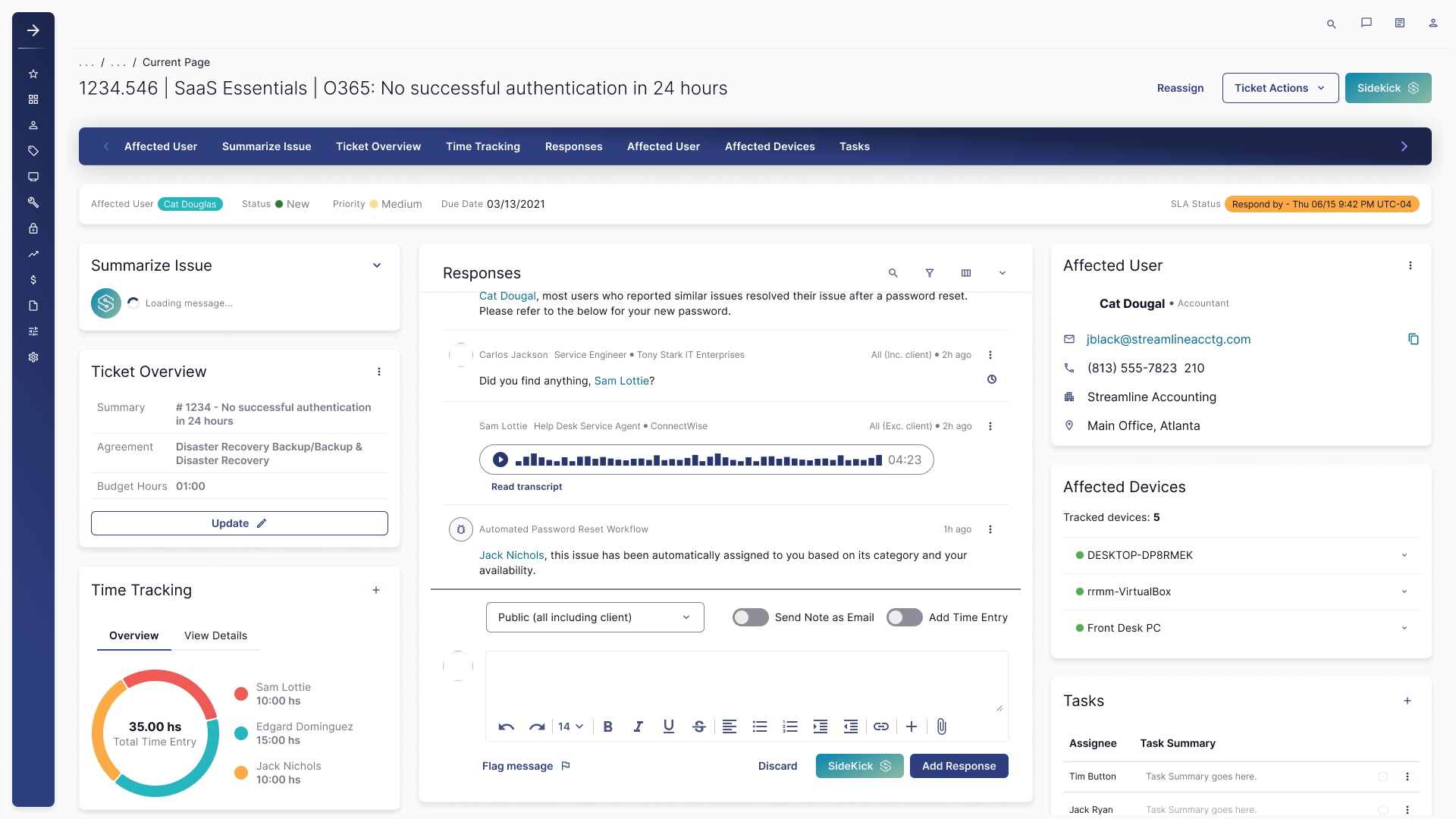
Objectives & Constraints
- Reduce time-to-triage and time-to-action in ticket workflows using grounded AI summaries and recommended next steps.
- Enable natural-language interactions for complex actions (workflow setup, automation, task creation) without increasing error rates.
- Design for trust: show sources, confidence cues, and safe fallbacks when data is missing or ambiguous.
- Respect enterprise constraints: permissions, tenancy, PII handling, audit logging, and regulated customer environments.
- Build a reusable AI UI kit (chat, citations, tool cards, warnings, error states) to prevent UX drift as features scale.
Project Details
- Role: UXUI Manager, Conversation Design, UX Systems + Governance
- Focus: AI copilots, NL interfaces, prompt patterns, evaluation loops
- Deliverables: UX flows, IA, UI kit components, prompt library, heuristics + QA rubric
- Tools: Figma/FigJam, Maze, analytics instrumentation, accessibility audits
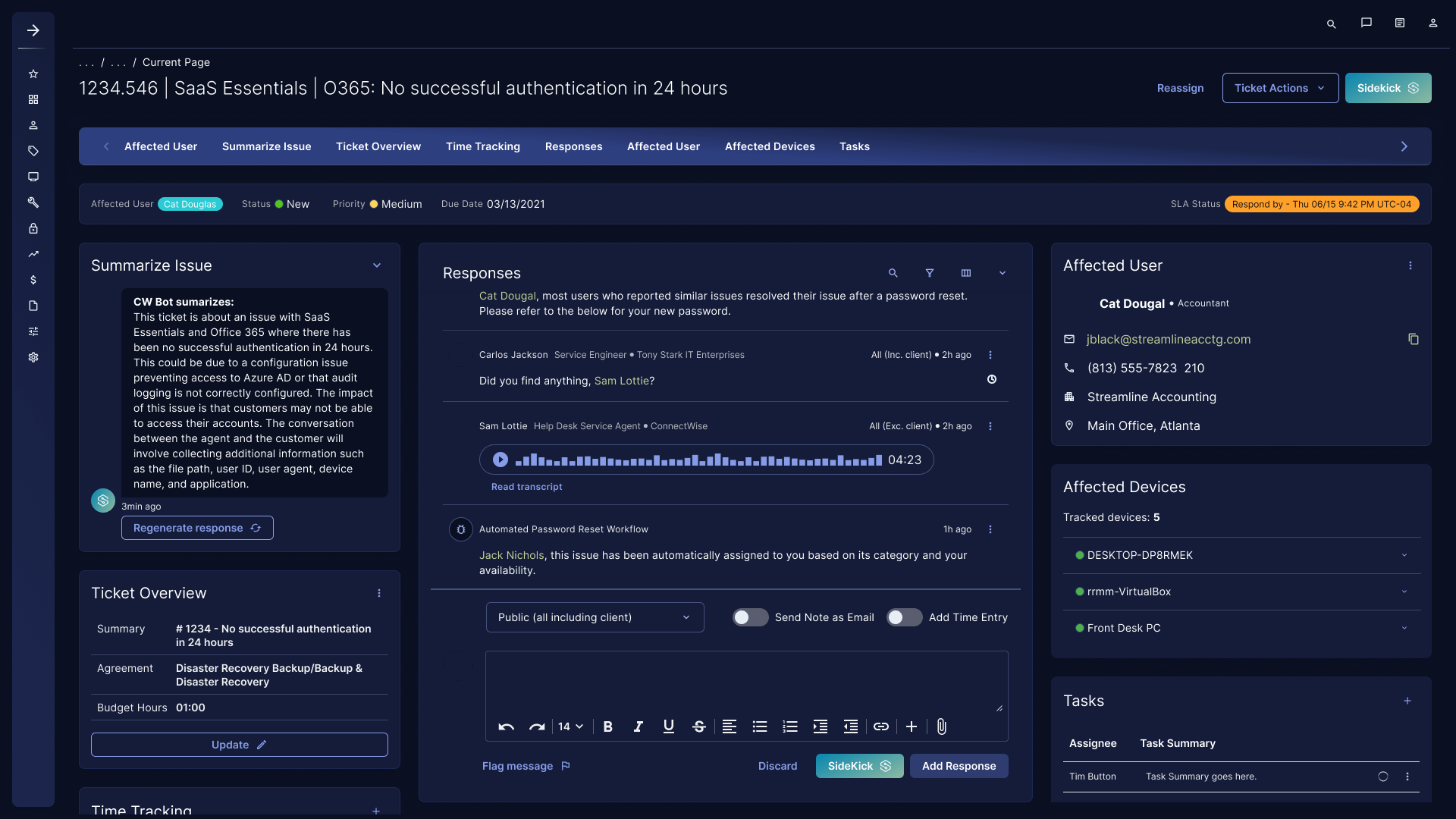
Use Case 1: Ticket Summaries + Next Best Actions
Support teams needed clarity fast. The AI pattern produces a structured summary (what happened, likely cause, impact, what to ask next) and suggests next actions (reset, verify config, collect logs, escalate) while avoiding false certainty. The UX goal was to reduce cognitive load without hiding ambiguity.
- Output design: short “topline” + expandable detail for power users.
- Trust: show what the summary was based on (ticket data, conversation, known issues) and flag gaps.
- Control: regenerate, edit, and insert into responses with explicit confirmation.
- Failure handling: low-confidence mode, permission errors, missing data prompts, human handoff.
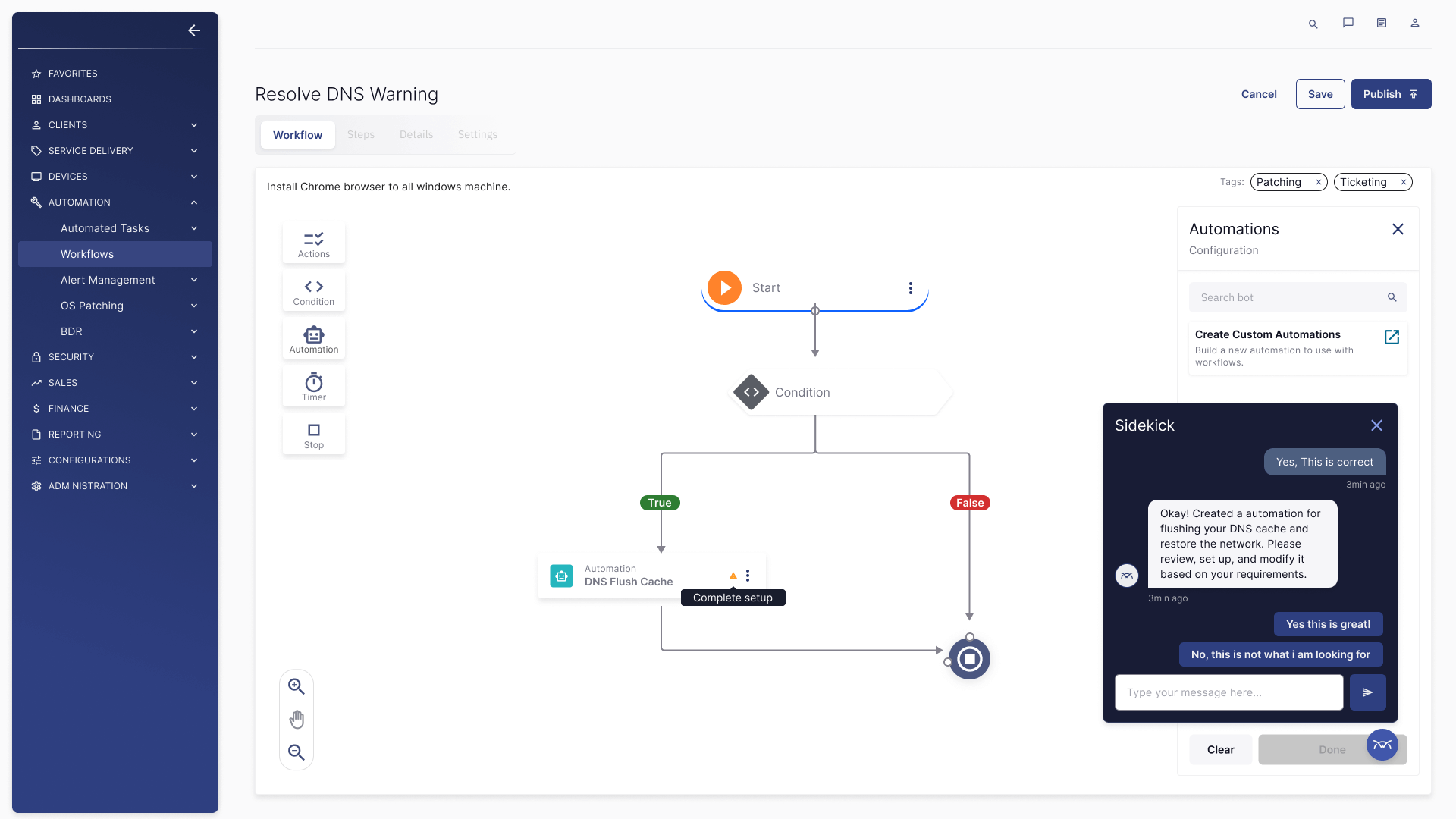
Use Case 2: Natural Language Automation in Workflow Builder
Admins want speed, but automation is high-risk. The AI pattern supports “describe the outcome” inputs (“flush DNS and restore network”) and generates a draft workflow. UX guardrails enforce review, validation, and “complete setup” requirements before activation.
- NL to structure: intent detection → actions/conditions/timers → draft workflow.
- Review gates: highlight missing required fields and risky steps.
- Safer defaults: confirmation language, rollback messaging, and audit trail visibility.
- Explainability: “why this step” microcopy to reduce blind trust.
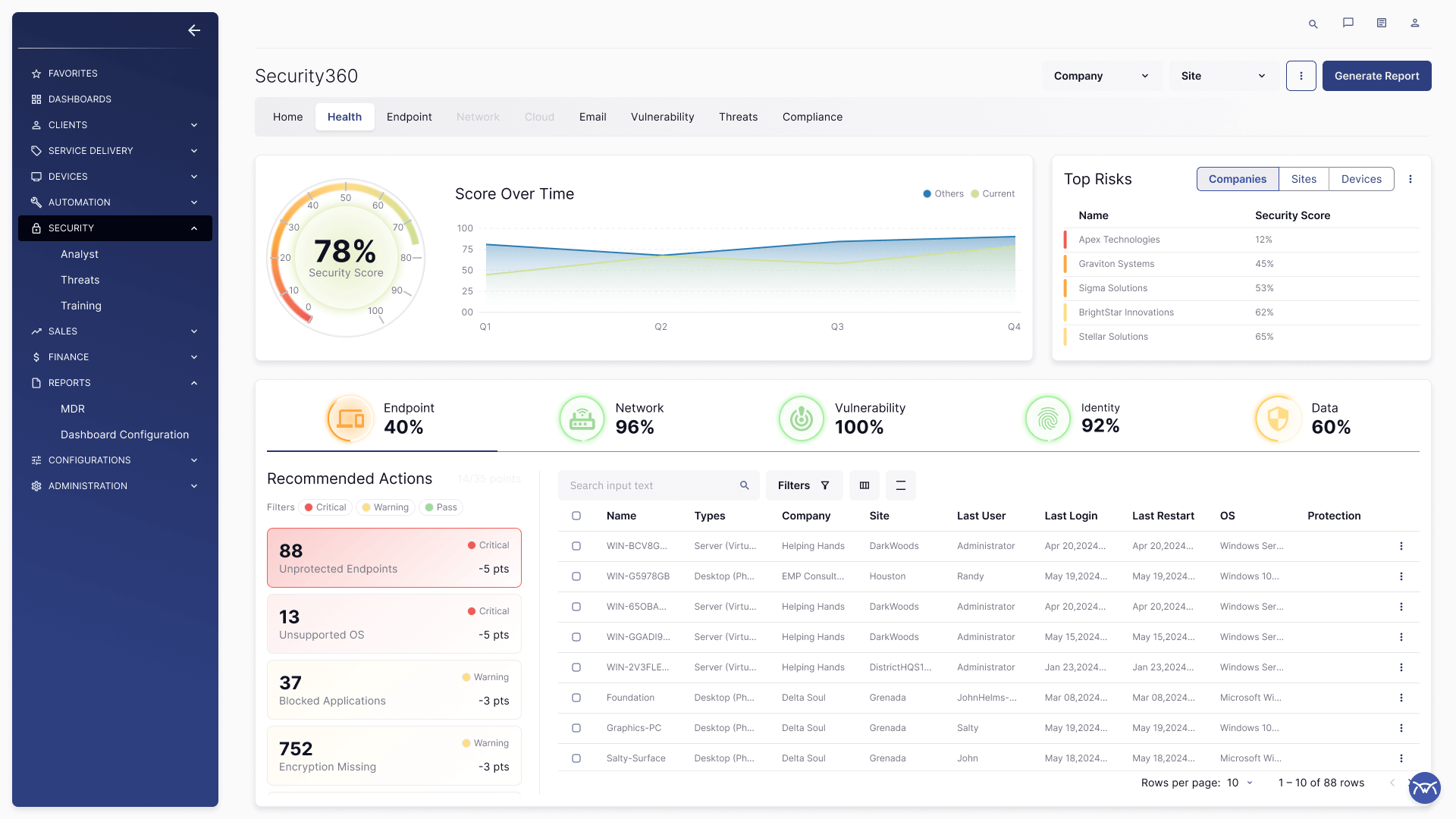
Use Case 3: AI-Assisted Monitoring + Risk Summaries
For security and monitoring dashboards, the AI strategy focused on turning dense telemetry into human-readable insights without obscuring the underlying data. UX patterns prioritize visibility, drill-down, and data-first storytelling.
- Summarize with anchors: insights tied to specific charts, time ranges, and entities.
- Decision support: recommended actions and impact framing, not generic explanations.
- Accessibility: readable hierarchy, contrast-safe tokens, keyboard focus order in dense dashboards.
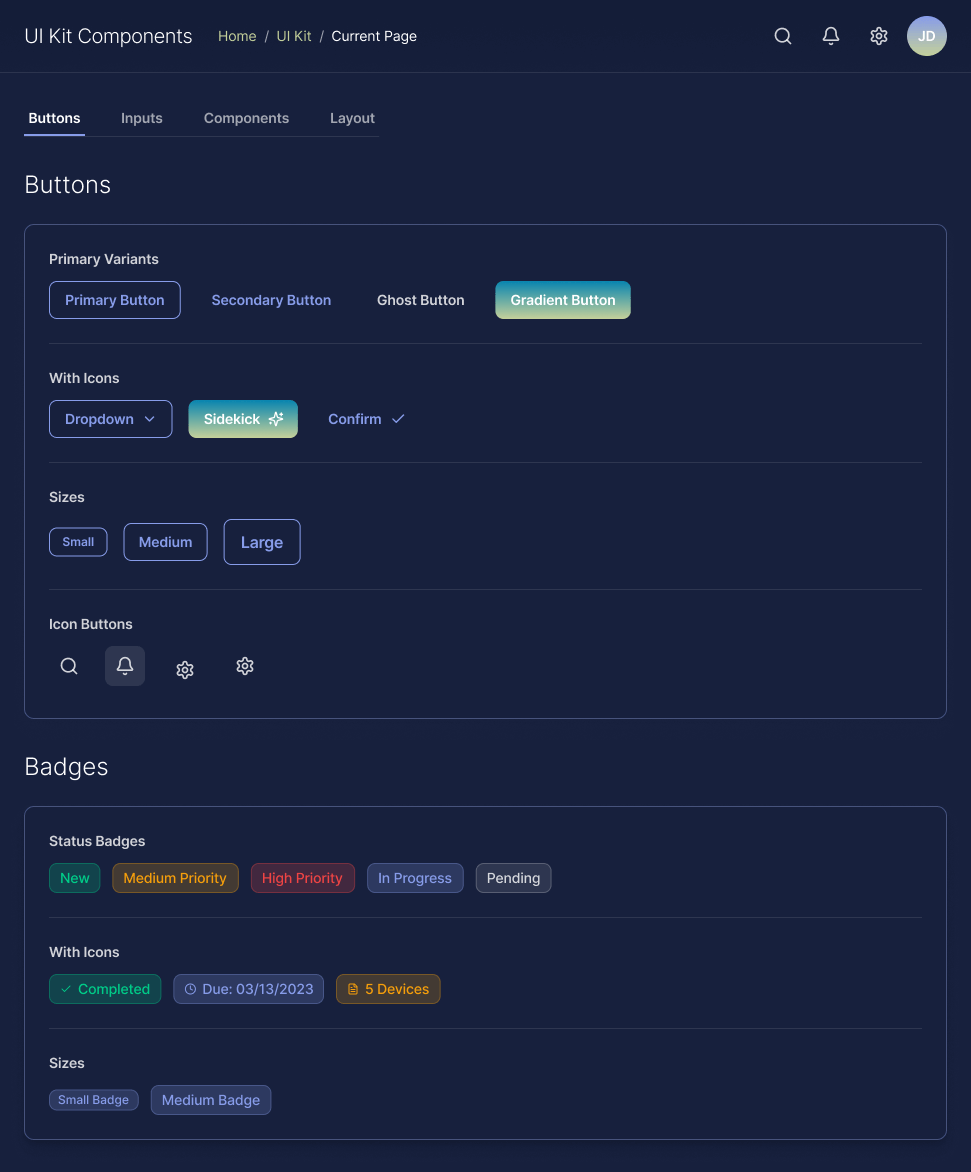
AI-Ready Design System Components
To scale AI UX safely across products, I defined reusable components and behaviors that standardize how AI shows up across surfaces.
- Chat surfaces: messages, citations, expandable answers, thumbs + reason.
- Tool cards: “Create ticket,” “Draft workflow,” “Generate response,” with review/confirm states.
- Trust patterns: confidence cues, “based on” chips, “missing info” prompts, and safe fallbacks.
- Safety patterns: PII warnings, permission boundaries, redaction states, audit indicators.
- Operational states: loading, streaming, partial results, regeneration, and error recovery.
Everything is documented with do/don’t guidance and accessibility requirements (contrast, focus order, reduced motion).
Prompting Standards
I designed prompt patterns as product infrastructure: consistent outputs, predictable failure behavior, and UI contracts that keep users in control. The goal is not “better prose.” The goal is reliable system behavior.
System Prompt Pattern (structure)
// Role
You are an enterprise assistant embedded in operational workflows.
// Grounding
Prefer governed sources and in-context ticket/device data. Do not invent.
// Permissions
Never reveal data outside the user's access. If blocked, explain and offer alternatives.
// Safety
Detect PII. Redact if needed. Avoid risky actions without confirmation.
// UX contract
Be brief by default. Use bullets. Offer drill-down. Return structured output for tools.
Ticket Summary Schema (structure)
{
  "issue": "1 sentence",
  "impact": "who/what is blocked",
  "likely_causes": ["ranked"],
  "what_to_check_next": ["ranked questions/data to collect"],
  "recommended_actions": ["safe next steps"],
  "confidence": "low|medium|high",
  "notes": "uncertainty + assumptions"
}
Natural Language → Workflow Draft (structure)
Input: user goal in plain language
Steps:
1) Classify intent (network, patching, ticketing, monitoring)
2) Extract entities (devices, OS, scope, constraints)
3) Generate draft: triggers → conditions → actions → notifications
4) Validate required fields; mark gaps as "needs setup"
5) Output: human-readable explanation + structured workflow definition
Evaluation + QA Rubric (structure)
Score each response on:
- Groundedness: tied to available data or cited sources
- Correctness: aligns with known workflow/ticket reality
- Safety: respects permissions + PII rules
- Usefulness: actionable next steps, not generic advice
- UX: scannable, no noise, correct level of certainty
Accessibility + UX Quality in AI Experiences
AI features add new failure modes: misleading confidence, unclear provenance, and inaccessible “helper” UI. I designed checks and patterns that keep experiences usable and compliant.
- WCAG-first tokens: contrast-safe badges, links, and dense data surfaces.
- Keyboard + screen reader: focus order for streaming content, expandable citations, and tool cards.
- UX heuristics for AI: transparency, controllability, error recovery, and calibrated trust.
- Guardrails UX: clear messages that explain why an answer/action is blocked and what to do next.
Outcomes
- AI embedded into existing workflows to reduce switching cost and improve speed-to-action.
- Standardized AI UI patterns via a design system to scale across teams without fragmentation.
- Prompt patterns treated as product infrastructure: predictable behavior, safer defaults, review gates.
- Trust-first UX: confidence calibration, provenance, and clear recovery paths.
Note: Quantitative metrics are confidential. This case study focuses on UX strategy, systems thinking, and scalable patterns.
What I Build Next as an AI UX Leader
Agentic workflows with strict review gates, role-aware experiences, multilingual enterprise support, and a governed “tool plugin” surface that scales safely across products. The core principle remains: grounded assistance, observable behavior, and UI patterns that keep humans in control.