Summary
AI is no longer experimental in UX organizations. High-performing teams use it to compress timelines, reduce ambiguity, and improve cross-functional communication. This page outlines how I apply AI tools across design, research, documentation, and delivery to increase output and outcomes without sacrificing quality or governance.
AI Strategy for UX
My approach treats AI as infrastructure, not novelty. I define where AI meaningfully augments human judgment and where it should not be used. The result is faster decision-making, better artifacts, and clearer alignment between Design, Product, and Engineering.
- AI-assisted ideation and exploration for wireframes and designs
- AI-generated drafts for UX documentation and specs
- AI-supported research synthesis and pattern detection
- AI-mediated communication between design, PMs, and devs
Figma AI in Production Design
Figma AI is used to accelerate layout generation, content scaffolding, and system-aligned variations. I enforce constraints so AI outputs remain compliant with design systems, accessibility standards, and brand rules.
- Generate first-pass layouts from structured prompts
- Rapid component variations for responsive states
- Content population aligned to real use cases
- Design system enforcement via tokens and components
Interface before Figma AI Prompt
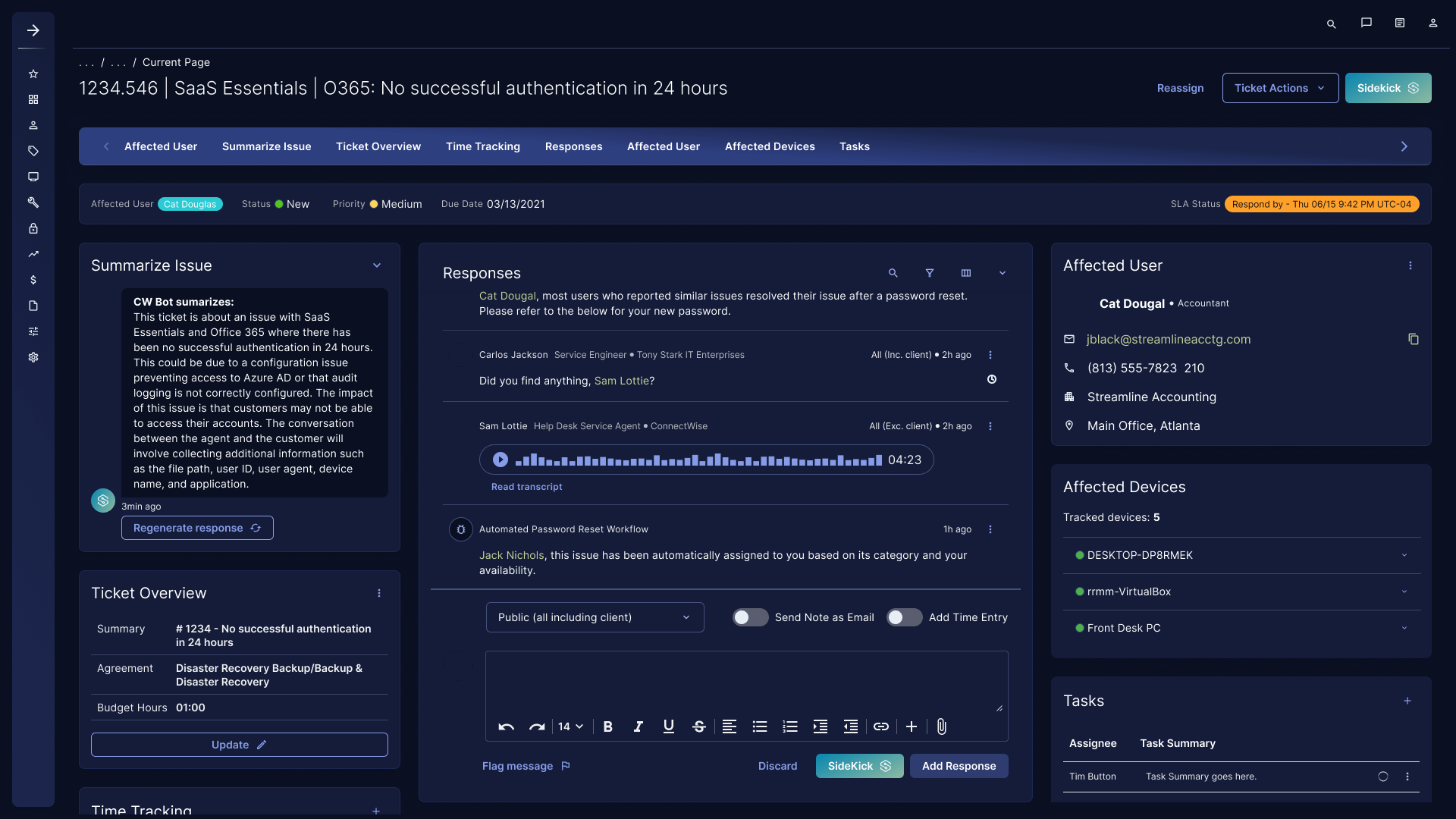
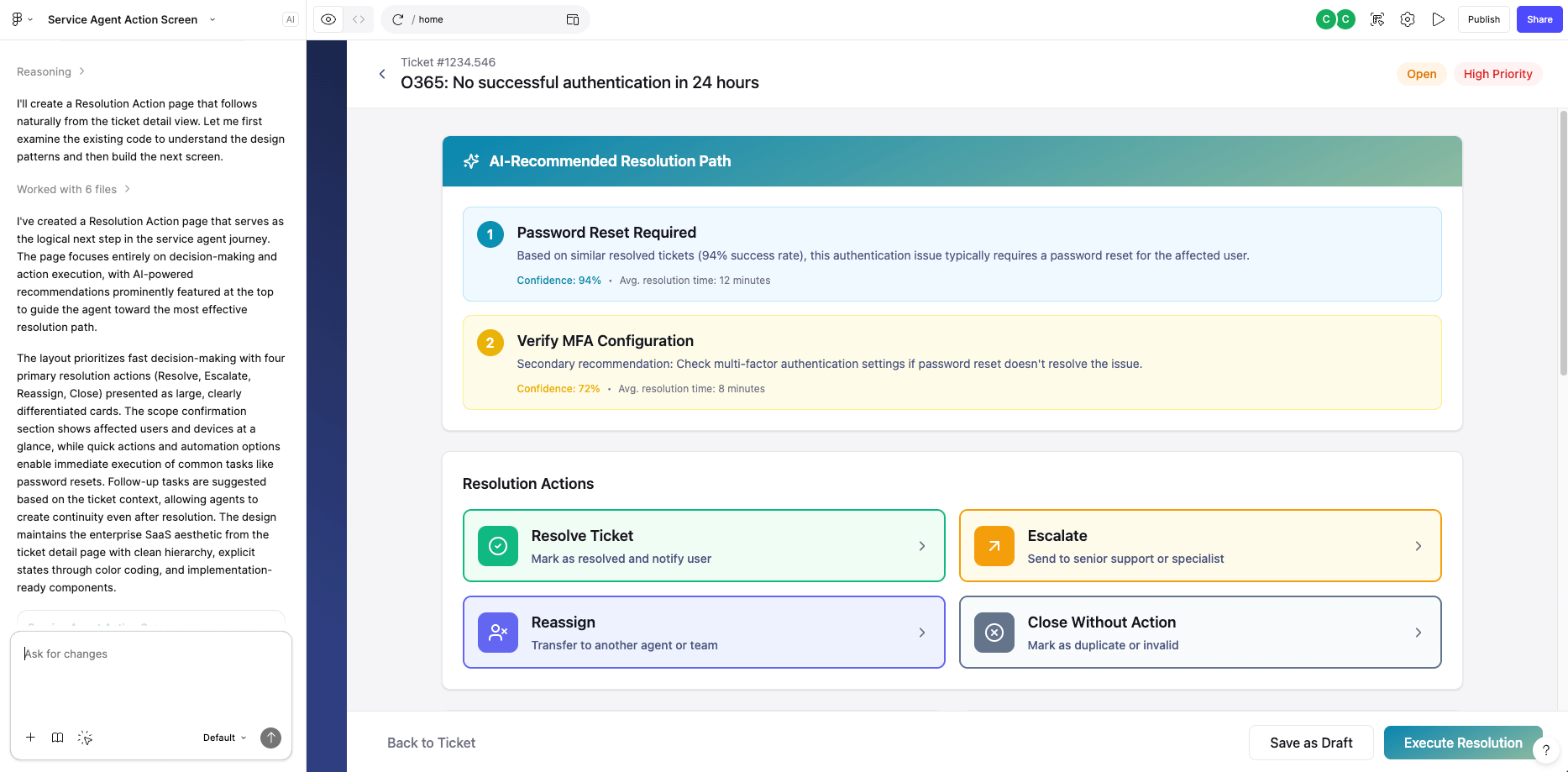
Prompt used: Using this ticket detail page as step one of the user journey, generate the next screen a service agent would logically move to after reviewing the issue, responses, affected users, and devices. This next page should focus on action and resolution, not intake. Assume the agent is ready to decide what happens next. The layout should clearly prioritize resolution actions such as resolve, escalate, reassign, automate, or close, surface AI-assisted recommended next steps based on ticket context, confirm scope (user and devices), and support follow-up tasks or automations. Reduce cognitive load, maintain continuity with the existing information architecture, and use clean, enterprise SaaS patterns with strong hierarchy, explicit states, and design-system-ready components. Optimize for fast decision-making and implementation readiness.
Interface after Figma AI Prompt
ChatGPT and CoPilot for UX Strategy and Communication
I use large language models to externalize thinking, accelerate synthesis, and standardize communication. This reduces cognitive load on teams and prevents misalignment before it reaches development.
- Translate vague requirements into structured UX briefs
- Draft user flows, edge cases, and acceptance criteria
- Summarize research findings into executive-ready insights
- Generate clear, dev-friendly design annotations
AI-Assisted Design–Dev–PM Alignment
AI acts as a translation layer between disciplines. I use it to ensure design intent, technical constraints, and business priorities remain synchronized throughout delivery.
- Convert designs into implementation-ready specs
- Summarise meeting notes to translate into actionable and measureable tasks
- Clarify edge cases and logic before build
- Reduce back-and-forth during development


AI Governance and Quality Control
AI increases speed only when paired with guardrails. I establish governance to ensure consistency, accuracy, accessibility, and legal compliance.
- Approved prompt libraries tied to UX standards
- Human review checkpoints for all AI outputs
- WCAG AA accessibility and content quality validation
- Clear guidance on where AI is prohibited
Measuring AI Impact in UX
I evaluate AI adoption using operational metrics, not novelty metrics. Success is defined by improved delivery, clarity, and product outcomes.
- Reduced design cycle time
- Fewer clarification questions from Engineering
- Higher consistency across surfaces
- Improved stakeholder confidence